
"I want to back up my documents in the cloud — but no provider should be able to read them. And I still want searchable documents with text recognition." If you search the web with requirements like these, you usually get the same answer: Not possible. Use two apps. A scanner app with local OCR here, an encrypted storage there — done is the workaround.
That answer used to be technically correct. Today it no longer has to be — and it is worth understanding why, because behind it lies the most interesting question in modern document management.
The dilemma, honestly explained
Why does everyone say it cannot work? The logic is simple and initially hard to refute:
- Zero-knowledge means: your documents are encrypted on your device before they go to the cloud. The provider sees only ciphertext — they cannot read what you store. That is the only way cloud storage can truly be trustworthy.
- OCR means: a program has to read your document to recognize text. If the provider runs text recognition on their server, the document must be readable there for a moment.
- Apparent contradiction: what the server cannot read, it cannot OCR. Hence the common conclusion: OCR must always run locally, and the storage never knows what is in your documents.
This is where the classic recommendations come from: Docutain + Filen (scan and OCR locally, store in an encrypted German cloud), Genius Scan + Cryptomator (scanner app plus encrypted vault over any cloud), or — for the tech-savvy — Paperless-ngx, fully self-hosted. All legitimate solutions. But they share a common price: two apps, two folder worlds, sync friction — or a server rack in your home.
The solution: you decide, per document
The way out of the dilemma is not to argue the contradiction away — it is to hand the choice to the user. That is exactly how DocNado has worked since November 2026:
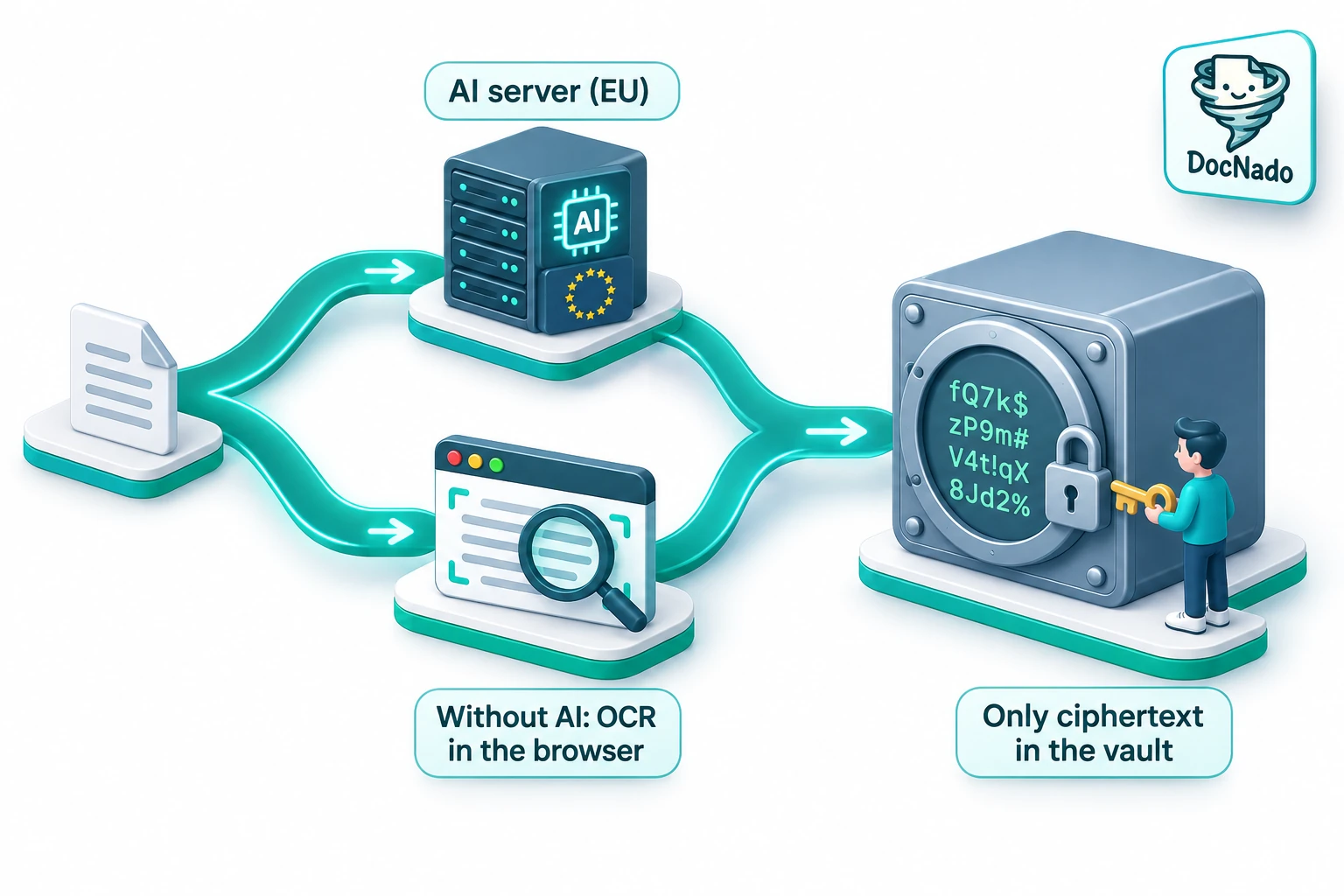
- With AI analysis: you scan, the document travels TLS-encrypted to analysis servers in Europe for a few seconds (not stored, no AI training), the AI recognizes merchant, amount, date and line items — and only afterwards is everything encrypted on your device and placed in your vault.
- Without AI analysis: you simply switch the AI off. Text recognition (OCR) then runs entirely in your browser — WebAssembly instead of a server. Title, amount, date and document type are suggested from the locally recognized text. Your document leaves the device exclusively in encrypted form.
In both cases the same promise holds: inside the vault there is nothing but ciphertext. The only difference is the moment of text recognition — at the provider or on your device. And you can decide per document: the uncritical supermarket receipt may use the convenient AI routine, the doctor's letter stays completely local.
The honest comparison with the 2-app combinations
Staying fair means acknowledging the real strengths of the established combinations. Here is the comparison without a marketing filter:
| Solution | Apps needed | OCR where? | Zero-knowledge | Management (tags, deadlines, search) | Hurdle |
|---|---|---|---|---|---|
| Docutain + Filen | 2 | Local (device) | Yes (Filen vault) | Docutain folders + file browser | Connecting two ecosystems |
| Genius Scan + Cryptomator | 2 | Local (device) | Yes (Cryptomator vault) | Folders + file-system search | Organizing vault sync yourself |
| Paperless-ngx | 1 (web) + hardware | Server (your own) | Only with extra effort | Very strong (tags, rules, full text) | Self-hosting, maintenance, backup |
| DocNado | 1 (PWA) | Your choice: AI server (EU) or locally in the browser | Yes (E2E, key stays with you) | Tags, buckets, deadline calendar, full text | Browser instead of app store |
What DocNado cannot do, we say just as openly: DocNado is not a server service for corporate archives, not an audited enterprise vault like Tresorit, and not a replacement for a full DMS with workflows. It is a document manager for private households and freelancers — with the ambition that you should not have to pay for privacy with convenience.
"But without AI I lose line items and summaries!"
Correct — and that is not a bug, it is physics. Without server-side AI there is no automatic line-item recognition and no AI summary. DocNado solves this with a practical middle path: add AI analysis later. You save your doctor's letter without AI — recognized completely locally, stored encrypted. Months later you do need the line items (for your tax return, say)? On the document detail page you fetch the AI analysis with one click — only then does the document travel to analysis, once. The decision stays with you, every single time. We stay fair on quota as well: every cloud save counts towards your plan’s page quota — even without AI, since the document sits in your vault. Only purely local saving on your own device remains unlimited and free.
How to verify what actually gets uploaded
Promises are one thing — your browser's network tab is another. When saving without AI, you can watch in the developer tools that the upload payload contains only encrypted blocks: no readable text, no image or PDF traces, your key stays on your device. The full step-by-step guide is in our article Verify Zero-Knowledge yourself.
And to stay honest about what this test does not show: it proves the data flow, not the code. DocNado is not an open-source app and currently has no independent security audit. If you need maximum, certified protection for company documents, an audited provider is the better choice — for everyday private document management, though, the two-minute test answers the most important question: does my document leave this device in plaintext? No.
Conclusion
"Zero-knowledge or OCR — pick one" was the old rule. The new reality: both in one app, decided per document. If you prefer to play it safe, you scan every document without AI and still keep full-text search, tags, deadlines and backup — and if you prefer convenience, you let the AI work while the servers are in Europe and nothing is stored. Switching between the two worlds is not a migration; it is a toggle when saving.
Curious? Try it — the free plan costs nothing: docnado.app